“Finally, one workspace instead of scattered inboxes. FRT dropped, and the team spends less time pushing tickets around.”
Helpdesk System for Businesses – full control over customer and internal requests
Centralize request handling, organize communication, and reduce response times with a modern helpdesk system tailored to your company’s real workflows. It is a ticketing system for businesses and an online request management system, delivered as a SaaS helpdesk with a customer portal for requests.
- One place for all requests (email, forms, API)
- Ticket automation, SLA and priority management
- Full communication history and KPI reporting
- Scalable solution for small and medium-sized businesses
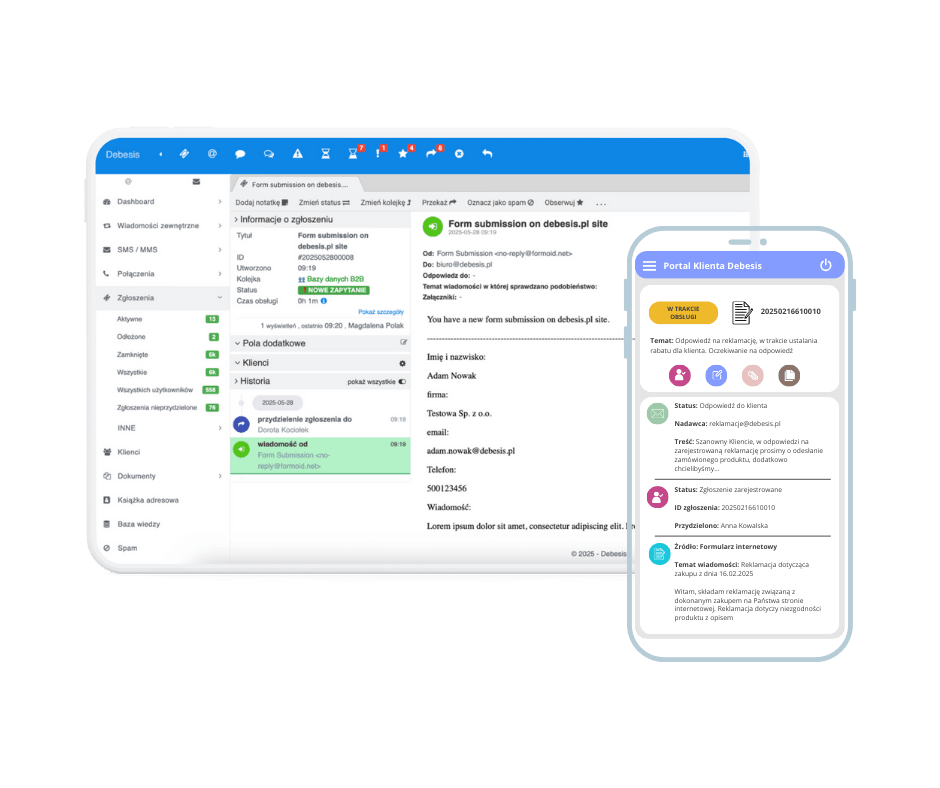
Features that bring order to request handling
Build a predictable support workflow — from intake to resolution and reporting. The system structures channels, classifies tickets, and tracks SLA deadlines so teams work with clear priorities and deliver consistent responses.
Managers see workload in real time, react to risks, and plan capacity. Full history improves reporting, while integrations with email, forms, and API reduce manual work and keep every step aligned with your service standards.
How it works (5 steps)
Users submit a request, the system structures the workflow, and you track results in metrics and operational decisions.
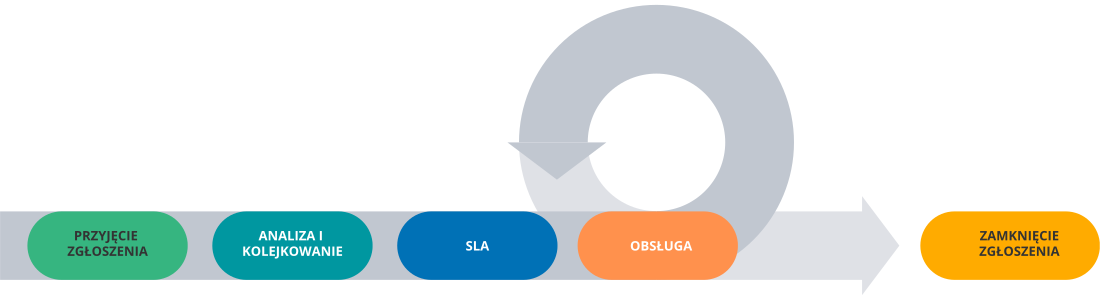
Ticket intake and creation (email / form / chat / phone)
Requests from email, phone, or forms become tickets with context, attachments, and history, preventing channel fragmentation and duplicate messages.
Smart routing and qualification (rules, tags, priorities, department, owner)
Rules classify, tag, and prioritize tickets, assigning them to the right team or owner and reducing handoff delays between teams.
SLA and schedule: deadlines, reminders, escalations
SLAs define response and resolution targets; reminders and escalations prevent breaches and respect business hours, priorities, and VIP rules.
Service and collaboration: macros, checklists, knowledge base
Macros, checklists, and internal notes speed up collaboration, while the knowledge base reduces errors and accelerates responses.
Closure and continuous improvement
After closure, FRT, ART, SLA, and backlog dashboards reveal bottlenecks and guide automation and process improvements.
Who is the helpdesk system for?
Best for teams where ticket volume grows and response time matters.
E-commerce & retail
Handle returns, complaints, and order questions in one place. Each ticket links customer history, shipment status, and warehouse notes. Automations shorten response time, while SLAs protect priority cases and reduce repeat contacts.
IT & helpdesk
Internal IT teams need priorities, queues, and clear roles. The system collects employee requests, assigns ownership, and tracks SLAs. A knowledge base speeds diagnosis, while reports reveal load and recurring issues.
Finance & insurance
Auditability, access control, and SLA tracking are essential for regulated workflows. The system logs every change, standardizes client communication, monitors deadlines, and reports risk so teams meet compliance requirements.
Healthcare
Secure communication, case statuses, and consistent procedures reduce errors in healthcare. Requests are routed to the right roles, history supports quality reviews, and SLAs protect appointment and service timelines.
Logistics & transport
One queue connects transport, warehouse, and customers. The system tracks delivery stages, enforces deadlines, escalates risks, and speeds claim resolution. Clear history helps coordinate partners across the supply chain.
Manufacturing & service
Service tickets, failures, and warranty claims need clear ownership and status. The system coordinates warehouse parts, schedules deadlines, documents repairs, and supports preventive improvements based on recurring issues.
Education
Student, IT, and admin requests in one queue simplify communication. Cases are categorized and routed to departments, deadlines are tracked, and notifications keep students informed of status and next steps.
Public services
Standardized workflows bring order to citizen requests and internal cases. The system assigns responsibility, tracks deadlines, and provides full history. Reports help plan resources and improve service quality across departments.
Key benefits for your business
Helpdesk features translate into measurable outcomes: faster support, lower costs, and a consistent customer experience across every channel.
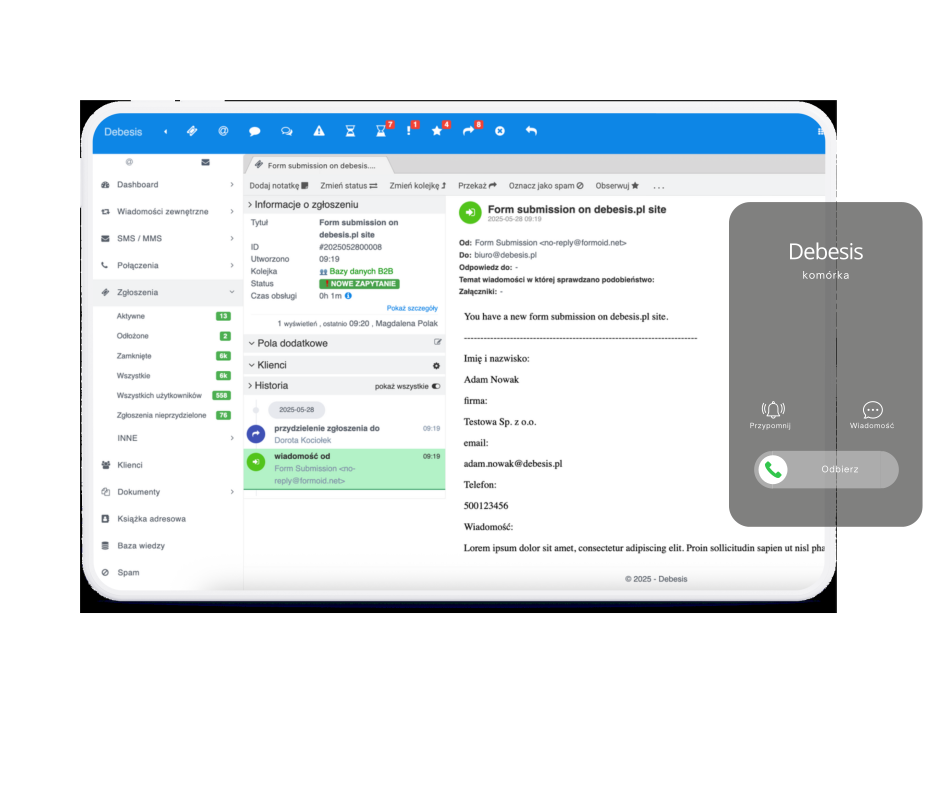
Phone call handling
Calls are captured as tickets with caller details, history, and context. Agents see customer data instantly, resolve faster, and hand off without losing information. SLAs cover phone interactions, improving consistency and overall service quality across the team.
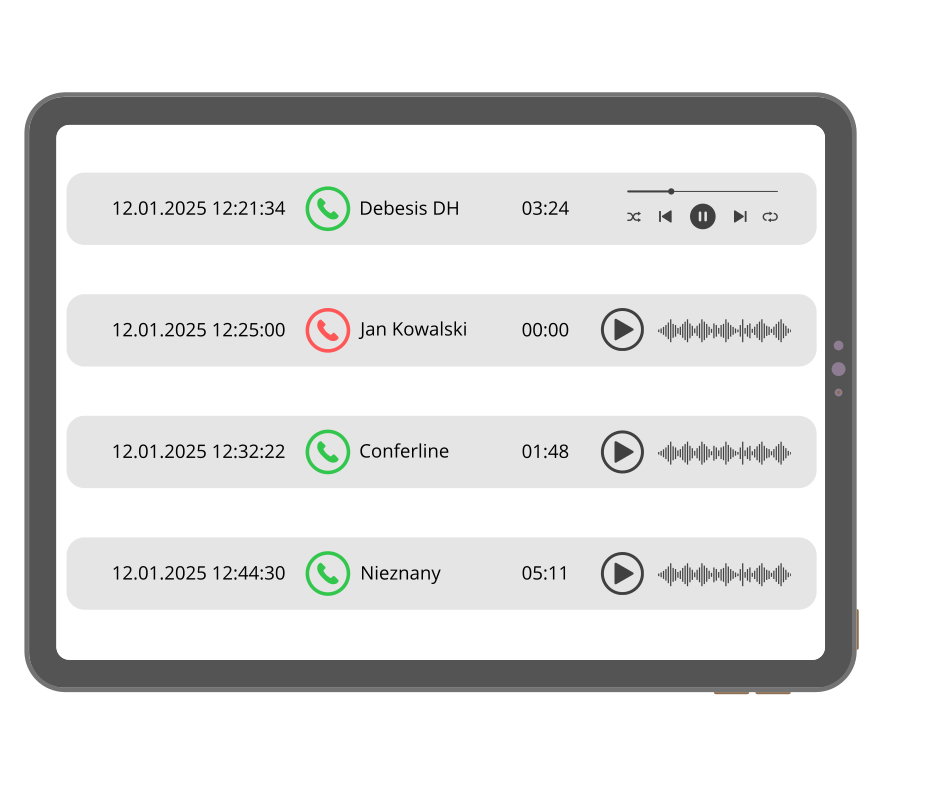
Call recording & monitoring
Recordings and call metrics help assess quality, coach teams, and resolve disputes. Visibility into duration, hold times, and reasons for contact supports process optimization. You can validate what happened and improve standards based on evidence.
Integrations
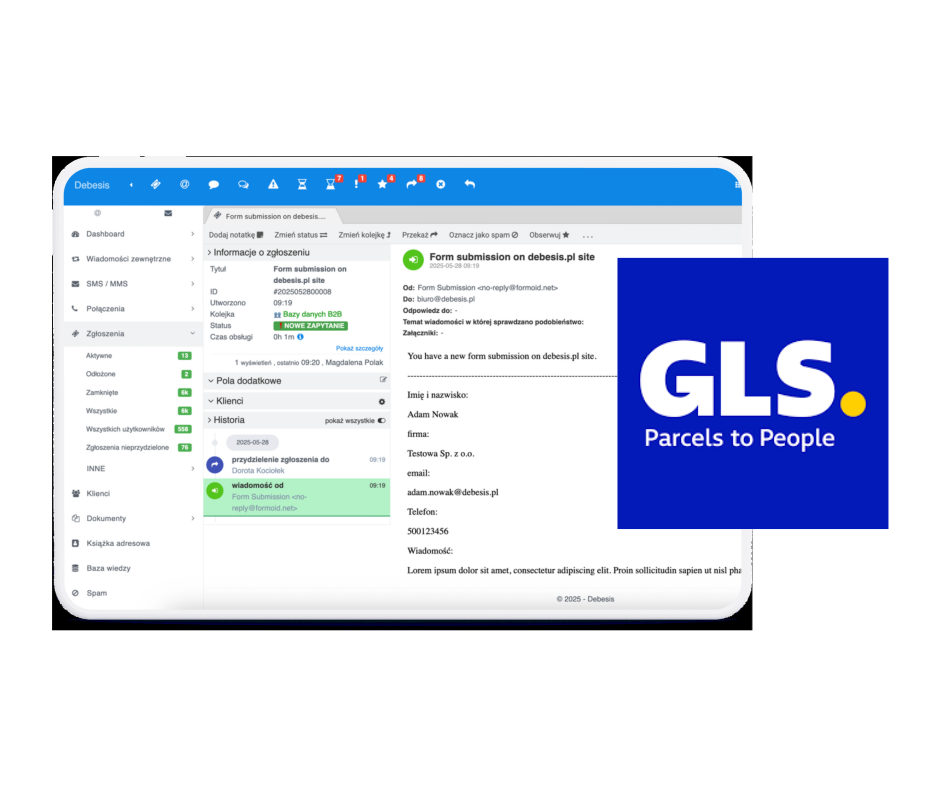
Integrations with BaseLinker, Shoper, IdoSell, Salesforce, and carriers (InPost, DPD, GLS) surface orders, payments, and shipment statuses directly inside each ticket. Agents can update data from the ticket view, and the API works bi‑directionally. The result is fewer context switches, faster decisions, and a complete customer conversation context.
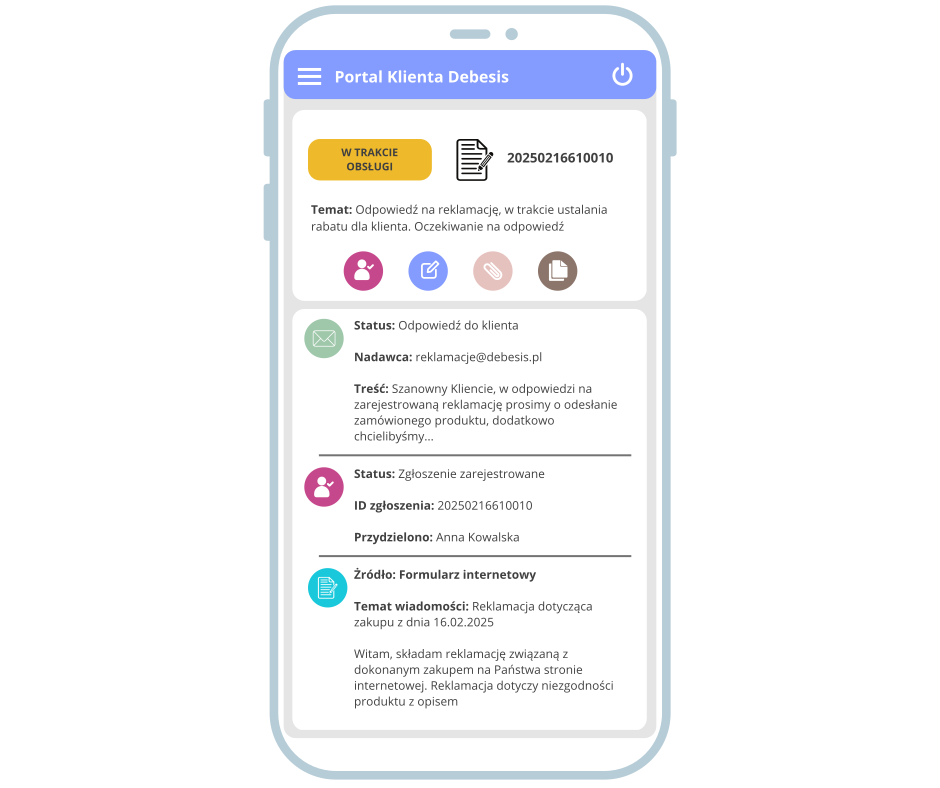
Customer portal
The customer portal enables self‑service requests and returns, status tracking, and adding documents or comments. It integrates with the ticketing system and RMA, keeping the entire process in one place so customers see progress without calling and teams keep a clean, searchable history.
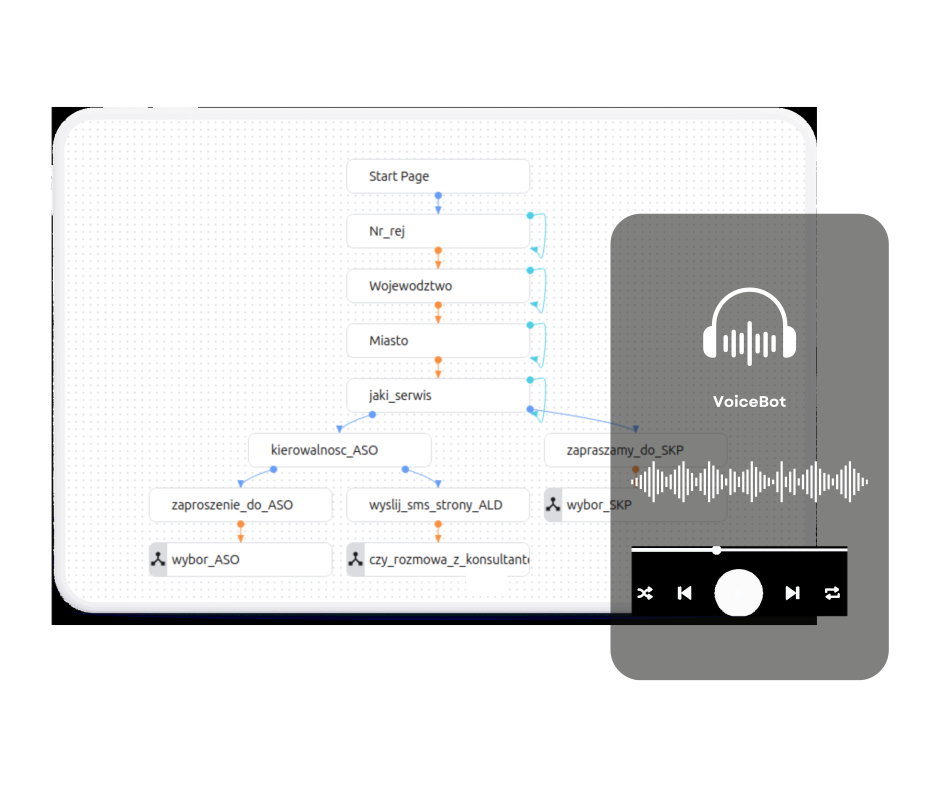
Voice Bot
A Voice Bot handles repetitive questions, qualifies requests, and routes them to the right team. Customers get instant answers while agents focus on complex cases. Always‑on workflows reduce queues and improve availability.
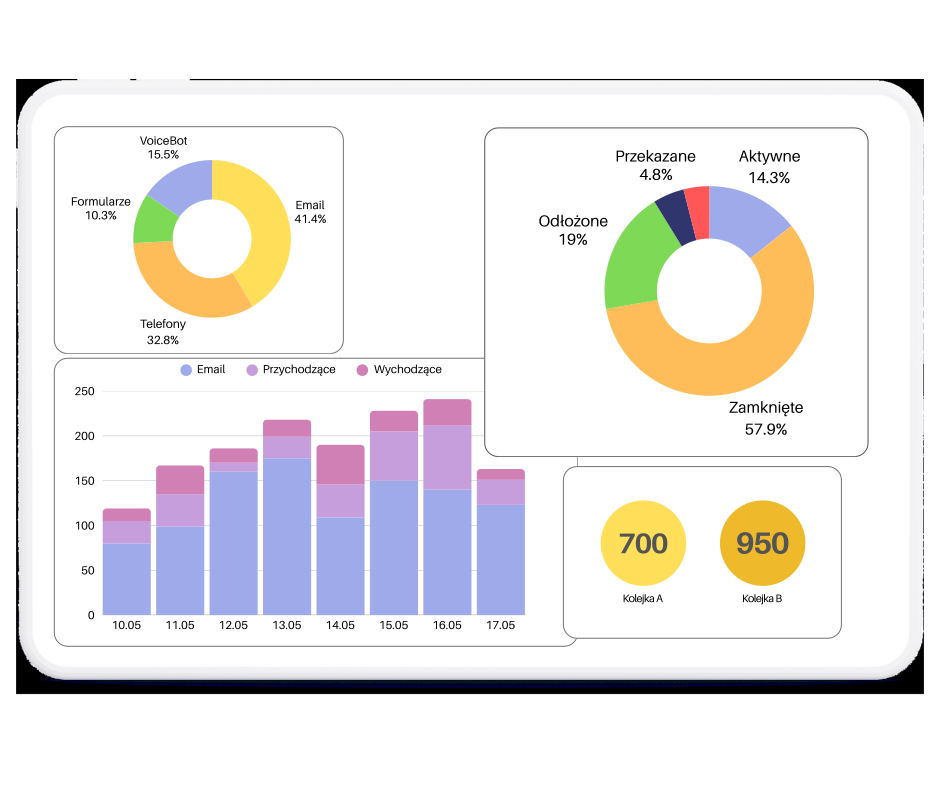
Reporting & analytics
Reports show response time, workload, and recurring issues. Data‑driven insight helps plan capacity, improve quality, and prove impact. KPI analysis surfaces bottlenecks so you can optimize processes with confidence.
Integrations that speed up support
Connect the helpdesk to tools you already use and cut handling time without manual copy‑paste.
- E-commerce & couriers: orders, payments, and shipment status inside tickets
- CRM & sales systems: full customer context and history
- API & webhooks: automated ticket creation and updates
FAQ — common questions
How quickly can the system be launched?
We recommend a fast start followed by phased optimization. First, we configure core channels, roles, and a basic workflow so the team can work immediately. Next, we refine categories, automations, SLAs, and reports based on real data from the first weeks. This approach keeps implementation predictable and reduces risk while still delivering value quickly. We provide a launch checklist, support data import, and help set priorities so the go‑live is smooth. The goal is a practical rollout that improves service quality without disrupting daily operations. In practice, this means less manual work, clearer priorities, tighter deadline control, richer context in customer conversations, and a workflow that scales without chaos even when ticket volume spikes during peak seasons.
Can the helpdesk handle multiple channels at once?
Yes, the system consolidates email, web forms, phone, API, and manual requests into one queue with a single ticket ID and full history. Agents always see context and customers do not need to repeat information across channels. Routing rules can automatically assign tickets to the right team, and SLA tracking keeps response times consistent regardless of how a request arrives. The result is a unified workflow with fewer duplicates, faster response, and clearer accountability. Multi‑channel intake also makes reporting more reliable because all interactions are captured in one place. In practice, this means less manual work, clearer priorities, tighter deadline control, richer context in customer conversations, and a workflow that scales without chaos even when ticket volume spikes during peak seasons.
Can we configure SLAs and priorities?
Absolutely. SLAs and priorities can be set by category, customer segment, contract type, or channel. You can define response and resolution targets, business hours, holidays, and escalation paths when thresholds are missed. Priorities can be assigned automatically based on keywords, customer data, or integration attributes. This ensures urgent cases surface quickly and the team always understands what should be handled first. SLA dashboards and reports provide visibility into compliance, which helps you manage expectations and improve performance across teams. In practice, this means less manual work, clearer priorities, tighter deadline control, richer context in customer conversations, and a workflow that scales without chaos even when ticket volume spikes during peak seasons.
How does data migration and history transfer work?
Migration can be done in stages to avoid disruption. Most teams start with active tickets and key customer data, then move historical records later if needed. We can import from CSV, API, or existing systems, and we map fields together before any data is moved. A test import is performed to validate accuracy, followed by a production import when everything looks correct. This phased approach minimizes risk and ensures consistency. The team can continue working during migration, and the cutover is planned to avoid downtime. In practice, this means less manual work, clearer priorities, tighter deadline control, richer context in customer conversations, and a workflow that scales without chaos even when ticket volume spikes during peak seasons.
What integrations are available?
Common integrations include IMAP/SMTP email, web forms, CRM/ERP platforms, e‑commerce systems, and shipping providers. These integrations pull customer context, order status, and identifiers directly into tickets, which speeds up resolution and reduces errors. We also provide webhooks and APIs for custom integrations with internal systems. A typical rollout starts with the most critical integrations, and additional ones are added as the process matures. This keeps implementation manageable while delivering immediate benefits, such as faster handling time and more consistent data across teams. In practice, this means less manual work, clearer priorities, tighter deadline control, richer context in customer conversations, and a workflow that scales without chaos even when ticket volume spikes during peak seasons.
Is the system secure and GDPR‑ready?
Yes. The platform supports role‑based access so only authorized users can view sensitive data. There is an audit trail of changes and actions, which supports accountability and compliance. Data minimization is encouraged, and sensitive fields can be hidden in specific views if required. We also help align processes with GDPR principles, including retention rules and clear access responsibilities. This combination of technical controls and process guidance makes it easier to pass audits and meet regulatory expectations. Security is treated as a core requirement, not an afterthought. In practice, this means less manual work, clearer priorities, tighter deadline control, richer context in customer conversations, and a workflow that scales without chaos even when ticket volume spikes during peak seasons.
Can we define roles and permissions for teams?
Yes, permissions are configurable per role and team, so each group sees only what they need. You can control access to tickets, edits, reports, exports, and sensitive fields. Roles can be assigned to internal teams, external partners, or specific customer groups, which helps keep collaboration structured and secure. Changes are easy to apply when teams or responsibilities evolve. This flexibility allows you to scale the helpdesk as your organization grows while keeping access consistent and compliant. It also reduces risk by limiting exposure of data to only the right people. In practice, this means less manual work, clearer priorities, tighter deadline control, richer context in customer conversations, and a workflow that scales without chaos even when ticket volume spikes during peak seasons.
How does reporting and KPI tracking work?
Reporting includes key service metrics such as first response time, time to resolve, SLA compliance, workload distribution, and volume trends. You can filter by channel, category, client, or time period and compare team performance over time. Dashboards provide real‑time visibility, while exports allow deeper analysis in external tools. This ensures decisions are based on data rather than impressions. Regular KPI reviews help identify bottlenecks, prioritize improvements, and plan staffing more accurately. In practice, reporting becomes a management tool that drives better service quality. In practice, this means less manual work, clearer priorities, tighter deadline control, richer context in customer conversations, and a workflow that scales without chaos even when ticket volume spikes during peak seasons.
Do you support automation and macros?
Yes. The system includes rules, macros, and templates to automate routine work. Tickets can be auto‑assigned by category, keywords, customer tier, or source. Macros speed up responses while maintaining consistent tone and quality. You can also trigger actions on status changes, such as notifications, escalations, or task creation. This reduces manual effort and ensures process consistency across teams. Automation helps agents focus on complex cases instead of repetitive tasks, improving both response time and overall customer satisfaction. In practice, this means less manual work, clearer priorities, tighter deadline control, richer context in customer conversations, and a workflow that scales without chaos even when ticket volume spikes during peak seasons.
What does onboarding and support look like?
Onboarding includes training for administrators and agents, plus guidance on best‑practice workflows. We provide documentation and practical checklists so the team can become productive quickly. Support covers configuration, troubleshooting, and process optimization as your usage grows. If needed, we can run refresher sessions or consult on advanced automations and reporting. The goal is not just to deploy software, but to help your team use it effectively day‑to‑day. With consistent support, the helpdesk becomes a reliable operational backbone rather than just another tool. In practice, this means less manual work, clearer priorities, tighter deadline control, richer context in customer conversations, and a workflow that scales without chaos even when ticket volume spikes during peak seasons.
Testimonials — what our clients say
Clients value the structure, fast response, and measurable improvement in handling time.
★★★★★ 5.0
“VoIP and store integrations save time. Agents see orders and shipment status without switching tabs.”
“Fast response and clear communication. The rollout was on time and delivered as agreed.”
“Express implementation: production-ready in a week. Agents were trained in one day, and support reacts immediately.”
Contact SystemHelpdesk.pl — schedule a demo
Reach out to us — we’ll advise and show the system in action.
Questions about helpdesk workflows, automation, or integrations?
Or want to schedule a free demo?
👉 Contact us directly — we respond quickly and clearly.
👉 We’ll advise how to improve ticket handling in your company.